
Resource Hub
Everything You Need, One Screen Inside Your CRM
The help center, the live calls, the playbooks you open mid-conversation, and the tools that build your week's content.
Help Center
Search articles and step-by-step guides and solve common questions on your own — fast.
Training Library
Every past coaching call, webinar, and live event, in one searchable place.
Two Calls A Week, Both At Noon
Tuesday is structured Q&A on prospecting and sales with Tyson. Friday is open mic with Joe — AI tools, apps, and whatever is in your way.
Campaign Playbooks
Book Is Requested
Confirm the request, send the book, and complete the next steps inside Advisor Nexus.
Call Is Scheduled
Prep fast, run a clean first call, and lock in specific next steps.
Following Up
Twenty-one touchpoints across four channels over seventy-five days, every message written out.
Sales Mindset
Nine sections on how to think, act, and sell like a top-producing advisor.
Objection Handling
NEPQ discovery questions, the Clarify–Discuss–Diffuse framework, and the top seven objections.
Practice Room
Practice The Call Before You Make It
The question we hear more than any other is what to say once somebody picks up. Pick a drill, talk to an AI prospect out loud, and hang up with a correction in your hand.
- 1Read The BriefTen seconds on who is picking up, what they asked for, and why you called.
- 2Make The CallAbout a minute on the phone with a prospect who pushes back like a real one.
- 3Get The CorrectionYour talk share, every closed question rewritten, and one thing to fix next.
Your Tools
Know Your CRM
Where Everything Lives
A three-minute tour of your account: what each page is for, and where to find it.
- Your Dashboard And Contacts
- Opportunities And Your Pipelines
- Social Planner And Media Storage
- Your Resource Hub
- Your Profile And Account Settings
- Email, Calendar, And Zoom Connected
Frequently Asked Questions
01What Do You Handle Vs. What Do I Handle?
02Do I Have To Personally Send LinkedIn Messages?
03Who Follows Up With LinkedIn Prospects?
04What Should I Do When A Prospect Responds Or Requests The Book?
05How Do Prospects Schedule Calls, And Where Does Zoom Come From?
06How Long Does It Take To See Activity Or Results?
07How Many Leads And Appointments Should I Expect Per Month?
08Do I Need LinkedIn Sales Navigator?
09Can I Pause Outreach Or Change My Targeting?
10How Do Billing, Cancellations, And Refunds Work?
Need Some Help?
Our team is here to help you get the most out of Advisor Nexus. Reach out anytime.
All Your Support + Tools, One Link
Everything you need in one place - support tickets, calls links, guides, and your exclusive access to Trained Advisor Apps
Help Center
Search articles and step-by-step guides to solve common questions on your own - fast!
LIVE Coaching
Join the next call for real-time guidance, feedback, and next steps.
Guides & Tools
The playbooks, scripts, and tools you'll actually use - built to help you get results faster!
- Trained Advisor Essentials -
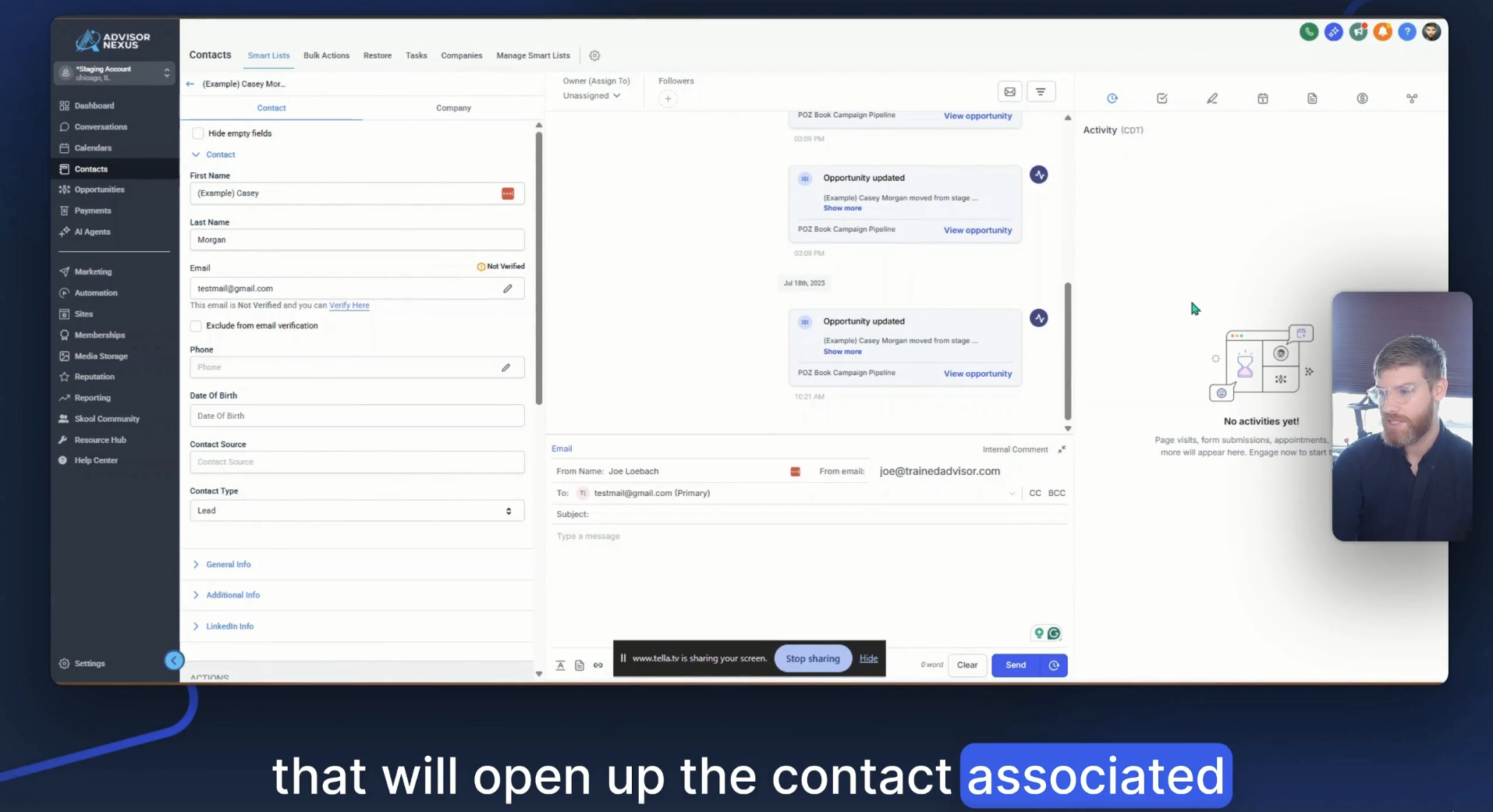
1. Advisor Nexus CRM Walkthrough
A quick walkthrough of Advisor Nexus so you know exactly where everything lives - contacts, conversations, pipelines, calendars, and key settings.
Before submitting a ticket, watch this walkthrough.
Dashboard & Opportunity Overview
Tasks & Notes Functionality
Conversations & Calendars
And Much More!
2. Onboarding Confirmation
Your Advisor Nexus account is set up based on your onboarding form answers.
Watch this video to confirm details and complete the setup!
Login & Confirm Profile Details
Review Key Account Settings
Integrate Email & Calendar
Connect Your Zoom/Meets/Teams Account
3. Get Support & Join LIVE Coaching Calls
Join LIVE Coaching Calls for Real-Time Answers
Use the Help Desk to Submit Support Tickets
Search the Help Desk for Walkthrough Guides
Frequently Asked Questions
1) What do you handle vs. what do I handle?
We handle the marketing execution (funnels, automation, messaging sequences, monitoring, and optimization). You handle the advisor side: taking booked calls, following up with warm prospects, and keeping us in the loop with feedback so we can improve performance.
2) Do I have to personally send LinkedIn messages?
No. Outreach is automated. You only step in when a prospect becomes “warm” (for example, after they request the book or take a clear action that signals interest).
3) Who follows up with LinkedIn prospects?
We do the initial follow-up and nurturing on LinkedIn (sending the link, reminders, and the standard follow-up flow) until the prospect requests a book/lead magnet. That keeps you out of the weeds so you can focus on high-quality conversations and calls.
4) What should I do when a prospect responds or requests the book?
In most cases, no action is needed inside LinkedIn. You’ll step in when you receive the notification that a prospect has submitted the request form or books a time - then you handle the advisor conversation and appointment.
5) How do prospects schedule calls (and where does Zoom come from)?
Your scheduling link is built into the campaign. When a prospect books, the system automatically creates the calendar invite and includes the Zoom meeting link (once your calendar + Zoom are connected in settings).
6) How long does it take to see activity/results?
You’ll typically see activity begin within the first couple of days once outreach is live, but real momentum can take a few weeks depending on targeting and market response. If things feel unusually quiet, submit a support ticket so we can review targeting, deliverability, and campaign health.
7) How many leads/appointments should I expect per month?
A common target is 8–12 book-request leads per month, with variation by niche, geography, and responsiveness. We track results and make ongoing adjustments to improve volume and quality.
8) Do I need LinkedIn Sales Navigator?
Yes - Sales Navigator is required to target the right prospects at scale. Without it, we can’t filter and reach your ideal audience effectively.
9) Can I pause outreach or change targeting/niche?
Yes. If you’re traveling or need a break, tell us and we’ll pause outreach. If you want to adjust targeting (niche, location, roles), submit a ticket with what you want changed and we’ll update the filters. Please note we cannot pause billing.
10) Billing, cancellations, and refunds — how does that work?
We bill according to your agreement and it’s month-to-month (you can cancel anytime). Because a lot of work happens upfront to build and launch your campaign, refunds aren’t typically offered, but if you’re unhappy, open a ticket so we can review what’s happening and fix the root issue.
Need Some Help?
© 2026 by Trained Advisor, LLC. All Rights Reserved